Entering data in a record
Enter text data
There are several types of data fields: text, number, date, container or calculation. Calculation fields are not directly modifiable; their content is dependent on values in other fields. Entering data in some fields is essential for the vGallery proper functioning, for example Edition and Reference fields in Works. If you leave these fields empty the symbol  or a warning dialog box will appear prompting you to fill-in them.
Very important: You can cancel a keyboard typing until you are out of the active field.
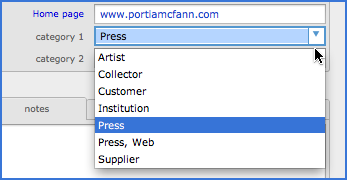
Generally, the data are entered directly into the fields. They can also be imported from other applications or external files (see Importing data chapter for more information). Some fields show whenever you move the cursor within, a list of values. These value lists automatically resume terms already entered in the same field in other records (see picture below).
 Advice on use
If you enter text by copy/paste, it will retain, in most cases, the style attributes (font, size, color...) of the original document. Immediately after pasting the text and without leaving the field, go to Edit -> Remove Formatting to remove the text style. The same effect is obtained by the key combination Apple+Z on Mac OS or Ctrl+Z on Windows. If the pasting action can not be canceled, go to Format -> Format by default. Holding down the Alt key on your keyboard, removes the formatting of the selected item in the set of records found.
Insert multimedia files
Container fields have an Insert button that allows insertion of graphics, PDF or videos. It is also possible to drop files from your computer desktop or in some cases, from other photo management software such as iPhoto or Aperture.
Images can be inserted into vGallery "physically" or be stored as a reference, in which case vGallery retains a link to the image. This preference can be set in User Settings.
Very important: If the images are stored as a reference, vGallery remembers only the path to the image. If you move or delete the image this path become invalid and the image field displays File Not Found: (followed by image file name). Inserting images as a reference has the advantage of not increasing the size of your database, ensuring the fluidity of its use, especially if you store high-resolution images. The videos however, are still stored as a reference.
Click here to know supported image file formats.
Importing a folder of image files
This operation is detailed in chapter Importing data.